
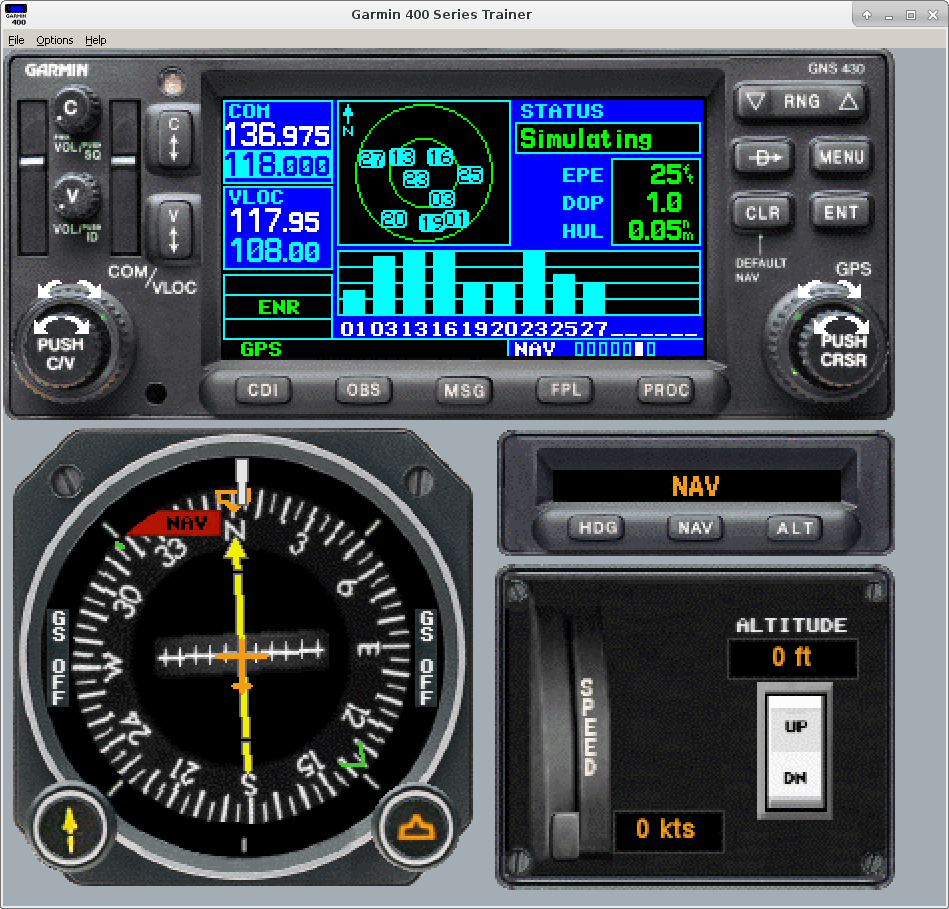
The Garmin GNS-430 is a common GPS unit for General Aviation aircraft. Once upon a time it was cutting edge. Now it’s no longer manufactured, but there is a large installed base and most training programs will involve such a unit. As a student pilot, or even an experienced one trying to get the most use out of it, the simulator Garmin provides for download here is very useful. The best time to familiarize yourself with it is on the ground in the safety of your home, not in the cockpit.
The simulator (technically called the “Garmin 400 Series Trainer”, supporting GPS 400, GNC 420, GNS 430 model emulation, with or without Terrain warning) only runs on Windows, but thanks to Wine , it’s possible to run it on Linux (in my case Fedora 23 x86_64) without the overhead and complexity of a VM. There are a few quirks, but it’s usable. Also note that some flight simulators such as X-Plane 10 Global Flight Simulator (PC & MAC)
- Install Wine if not installed (
dnf -y install wine). Depending on what else you’ve already installed, this may pull in a large number of dependencies. - Download the file from Garmin’s site above. Currently, the direct URL is 400SeriesSimulator_501.exe
- Rename this to what it really is — a zip file
$ file 400SeriesSimulator_501.exe

400SeriesSimulator_501.exe: PE32 executable (GUI) Intel 80386, for MS Windows

$ unzip -l 400SeriesSimulator_501.exe

Archive: 400SeriesSimulator_501.exe

Length Date Time Name

--------- ---------- ----- ----

40 03-08-2006 14:42 Autorun.inf

106500061 03-08-2006 14:46 data1.cab

114 03-08-2006 14:45 DATA.TAG

766 03-08-2006 14:42 Icon.ico

4557 05-30-1997 11:31 lang.dat

392 03-08-2006 14:46 layout.bin

417 05-06-1997 14:15 os.dat

763254 01-17-2006 10:05 setup.bmp

59904 11-19-1997 16:09 SETUP.EXE

58 03-08-2006 14:45 SETUP.INI

57238 03-08-2006 14:44 setup.ins

49 03-08-2006 14:46 setup.lid

300178 11-19-1997 16:05 _INST32I.EX_

8192 11-19-1997 16:05 _ISDEL.EXE

11264 11-19-1997 16:08 _setup.dll

186233 03-08-2006 14:45 _sys1.cab

47211 03-08-2006 14:45 _user1.cab

--------- -------

107939928 17 files

$ mv 400SeriesSimulator_501.exe garmin-400SeriesSimulator_501.zip

$
- Since it extracts into the current dir without extra unzip args, just create a directory to extract into:
$ mkdir garmin-400SeriesSimulator_501

$ cd garmin-400SeriesSimulator_501/

$ ls

$ unzip ../garmin-400SeriesSimulator_501

Archive: ../garmin-400SeriesSimulator_501.zip

inflating: Autorun.inf

inflating: data1.cab

inflating: DATA.TAG

inflating: Icon.ico

inflating: lang.dat

inflating: layout.bin

inflating: os.dat

inflating: setup.bmp

inflating: SETUP.EXE

extracting: SETUP.INI

inflating: setup.ins

inflating: setup.lid

inflating: _INST32I.EX_

inflating: _ISDEL.EXE

inflating: _setup.dll

inflating: _sys1.cab

inflating: _user1.cab

$ ls

Autorun.inf data1.cab DATA.TAG Icon.ico _INST32I.EX_ _ISDEL.EXE lang.dat layout.bin os.dat setup.bmp _setup.dll SETUP.EXE SETUP.INI setup.ins setup.lid _sys1.cab _user1.cab

$ - Now run the installer under Wine:
$ wine ./SETUP.EXE

wine: created the configuration directory '/home/someuser/.wine'

fixme:winediag:start_process Wine Staging 1.9.1 is a testing version containing experimental patches.

fixme:winediag:start_process Please mention your exact version when filing bug reports on winehq.org.

.

.

.
NB: Several errors scroll by that didn’t impact my usage. Then I got Wine popup asking to install Gecko for HTML rendering (see https://wiki.winehq.org/Gecko). This despite it already being present from the Fedora package:
# ls /usr/share/wine/gecko/

wine_gecko-2.40-x86_64.msi wine_gecko-2.40-x86.msi

#
In any case, I accepted the install prompt twice before it proceeded with the install. During the install, I used default options. - After the install, you need to find the actual executable to launch the simulator/trainer. In my case, I initially used the Wine Explorer window (launch with
wine explorerfrom a shell prompt if not running) and foundC:\Program Files (x86)\GARMIN\GARMIN 400 Series Trainer\GNC400WT.EXE. launch from the CLI.To launch from a shell:
$ cd $HOME/.wine/drive_c/Program Files (x86)/GARMIN/GARMIN 400 Series TrainerThis can be wrapped into a shortcut from your desktop environment if you so desire.
$ wine ./GNC400WT.EXE
Once running, a few things needed to be sorted out:
- Selected Options->Views->200% to magnify the view on my 1920×1200 monitor
- this caused some other parts of the display to disappear — the HSI, nav radio, altitude setting panel
- had to click in the blank space of the window where they should be to make them appear, but this doesn’t feel consistently reliable.
- Switched on the GNS430 by pushing on the C knob
- Went into Options->Initialize Position …, and it opened a menu inside the virtual GNS430 where I selected my home airport using the virtual knobs